
Screenshots
About Photo Analog Clock Live Wallpaper-7
Transform your Android device with a customizable analog clock live wallpaper that turns your favorite photos into functional timepieces. Photo Analog Clock Live Wallpaper-7 lets you create a truly personalized clock experience by combining beautiful imagery with practical timekeeping.
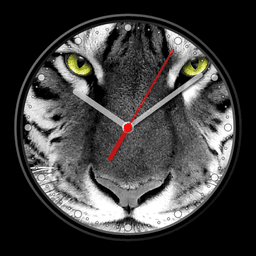
Build your perfect clock by selecting any photo from your gallery or choosing a solid color as your dial background. Customize every visual element to match your style—adjust hand colors, marker styles, and background hues. Add a digital clock display, second hand, or numerical markers to suit your preference. The intuitive drag-and-drop positioning and resizing tools let you place your clock exactly where you want it on your home screen.
Enjoy multiple display modes that adapt to your needs. Use the clock as a traditional live wallpaper, a home screen widget, or an always-on screensaver while your device charges. The Night Clock mode activates a battery-saving dark theme with black backgrounds and muted gray hands—perfect for nighttime use without draining your battery. Random position changes every minute help prevent screen burn-in on OLED displays, keeping your device protected during extended use.
Activate Always-on Display emulation to keep your clock visible even when the screen is off, with manual control over brightness and auto-lock features for seamless integration. The fullscreen mode works flawlessly across all display options, giving you flexibility in how you want to experience your clock. Enable time-to-speech functionality with a simple double-tap or set it to announce the time periodically—ideal for hands-free access throughout your day.
Advanced customization options let you set background images, control screen timeout behavior, and fine-tune every aspect of your clock's appearance. Whether you want an overlay clock floating above your other apps, a screensaver for charging moments, or an integrated home screen widget, Photo Analog Clock Live Wallpaper-7 adapts to your lifestyle. Create a clock that's truly yours—functional, beautiful, and perfectly aligned with your personal style.
Pros & Cons
Pros
- Extensive customization options for dial, hands, markers, and background colors
- Multiple display modes including live wallpaper, widget, screensaver, and always-on display
- Night Clock mode with dark theme designed to reduce battery drain at night
- Random position shifts every minute help prevent OLED screen burn-in during extended use
- Time-to-speech feature enables hands-free time announcements via double-tap or scheduling
Cons
- Always-on Display emulation may significantly increase battery consumption if enabled continuously
- Requires gallery and display permissions to access photos and function as live wallpaper
- Complex customization interface with many settings could overwhelm users seeking a simple clock
- Photo-based dials may reduce readability if selected images have low contrast with clock hands
Related Apps

AlienGUIse
Desktop themes and manager for Windows — transform your system with 5 futuristic designs.

SharpKeys
Remap keyboard keys to launch apps, media controls, and custom commands on Windows.

RocketDock
Desktop launcher for Windows — quick access dock with customizable icons and positioning.

Custom Resolution Utility (CRU)
Display resolution utility: Create custom resolutions for your monitor with precise refresh rate control.

Lagguy Wallpapers
Lagguy
4K & HD wallpapers for Android — minimal, abstract, nature, AMOLED designs with lifetime access

Lock Screen OS
Apps Genz
Customize your lock screen with widgets, photos, and notifications. Replace Android's default lock screen.
Latest Articles

Play a free Color Ball Sort Puzzle-style game in your browser (no download)
Oct 6, 2026

Play a free Beach Buggy Racing-style kart racer in your browser (no download)
Oct 6, 2026

Play a free Alto's Adventure-style game in your browser (no download)
Oct 6, 2026

Free online whiteboard like Jamboard: use Quickboard in your browser, no signup
Oct 6, 2026

Free online running pace calculator: splits, race predictor and daily challenge, no download
Oct 6, 2026